Rust的快速版本更新频繁,这既是它的优点,也给安装管理带来了挑战。由于各个平台上版本众多,我们该如何高效地进行安装和管理?这确实是值得我们关注的问题。
Rust版本特性
Rust每六周就会推出快速版本更新。这种频繁的迭代让它在不断进步。比如,2022年的多次更新中,它的性能就有了明显的提高。它兼容多个平台,包括Windows、Linux和macOS等。无论哪个平台上的开发者都能使用它。而且,随着时间的推移,还会出现各种不同的构建版本。
在实际应用中,开发者需依据项目需求挑选恰当的版本。以长期稳定的项目为例,可能并不适宜采用过于新颖的实验性版本。
cargo --version
管理Rust版本的工具
Welcome to Rust!
This will download and install the official compiler for the Rust
programming language, and its package manager, Cargo.
Rustup metadata and toolchains will be installed into the Rustup
home directory, located at:
  C:Usersintha.rustup
This can be modified with the RUSTUP_HOME environment variable.
The Cargo home directory located at:
  C:Usersintha.cargo
This can be modified with the CARGO_HOME environment variable.
The cargo, rustc, rustup and other commands will be added to
Cargo's bin directory, located at:
  C:Usersintha.cargobin
This path will then be added to your PATH environment variable by
modifying the HKEY_CURRENT_USER/Environment/PATH registry key.
You can uninstall at any time with rustup self uninstall and
these changes will be reverted.
Current installation options:
   default host triple: x86_64-pc-windows-msvc
     default toolchain: stable (default)
               profile: default
  modify PATH variable: yes
1) Proceed with installation (default)
2) Customize installation
3) Cancel installation
>1
info: profile set to 'default'
info: default host triple is x86_64-pc-windows-msvc
info: syncing channel updates for 'stable-x86_64-pc-windows-msvc'
info: latest update on 2021-02-11, rust version 1.50.0 (cb75ad5db 2021-02-10)
info: downloading component 'cargo'
  3.6 MiB /   3.6 MiB (100 %) 907.9 KiB/s in  4s ETA:  0s
info: downloading component 'clippy'
  1.6 MiB /   1.6 MiB (100 %) 730.8 KiB/s in  2s ETA:  0s
info: downloading component 'rust-docs'
 14.6 MiB /  14.6 MiB (100 %) 985.6 KiB/s in 16s ETA:  0s
info: downloading component 'rust-std'
 20.9 MiB /  20.9 MiB (100 %) 992.0 KiB/s in 23s ETA:  0s
info: downloading component 'rustc'
 52.1 MiB /  52.1 MiB (100 %) 1020.8 KiB/s in  1m  3s ETA:  0s
info: downloading component 'rustfmt'
  2.0 MiB /   2.0 MiB (100 %) 964.9 KiB/s in  2s ETA:  0s
info: installing component 'cargo'
info: using up to 500.0 MiB of RAM to unpack components
info: installing component 'clippy'
info: installing component 'rust-docs'
 14.6 MiB /  14.6 MiB (100 %)   1.2 MiB/s in 15s ETA:  0s
info: installing component 'rust-std'
 20.9 MiB /  20.9 MiB (100 %)   8.0 MiB/s in  1m 34s ETA:  0s
info: installing component 'rustc'
 52.1 MiB /  52.1 MiB (100 %)   8.3 MiB/s in  6s ETA:  0s
info: installing component 'rustfmt'
info: default toolchain set to 'stable-x86_64-pc-windows-msvc'
  stable-x86_64-pc-windows-msvc installed - rustc 1.50.0 (cb75ad5db 2021-02-10)
Rust is installed now. Great!
To get started you need Cargo's bin directory (%USERPROFILE%.cargobin) in
your PATH environment variable. Future applications will automatically
have the correct environment, but you may need to restart your current shell.
Press the Enter key to continue.
管理Rust在不同平台上的构建版本,并确保其兼容性,这一点至关重要。为此,我们有专门的工具可以借助,它能够支持Beta版以及其他特定频道的版本安装。例如,在进行交叉编译时,这个工具能够有效管理所需的编译版本。若您之前已经安装了Rust,只需执行特定的指令即可完成升级。以Windows平台为例,只需按照提示操作,升级过程便能顺利进行。
版本管理工具被众多开发者所采用,用于管理多个版本。尤其在进行多个项目时,每个项目可能需要使用不同的Rust版本。
$ rustc --version
使用Cargo安装Rust
大多数开发者推荐采用Cargo来安装Rust,Cargo既是Rust的构建工具,也是包管理器。在安装过程中,它会自动将最新稳定版的Cargo一同安装。
curl --proto '=https' --tlsv1.2 -sSf https://sh.rustup.rs | sh
2023年的调查结果显示,新手开发者们在初次安装Rust时,普遍选择了这种方式。这种做法功能多样,例如,它可以负责管理项目的依赖关系。对于一些规模较大的项目,它们需要依赖众多库,而Cargo则能够高效地处理这些依赖。
Windows中的Rust安装
# 用于更新 toolchain
export RUSTUP_DIST_SERVER=https://mirrors.ustc.edu.cn/rust-static
# 用于更新 rustup
export RUSTUP_UPDATE_ROOT=https://mirrors.ustc.edu.cn/rust-static/rustup
在Windows系统里安装Rust,需要先点击一个特定的链接,然后按照页面上的指示进行操作。完成所有步骤后,Rust就能成功安装,而且系统的PATH变量也会自动加入到PATH中。
# ~/.cargo/config
[source.crates-io]
registry = \"https://github.com/rust-lang/crates.io-index\"
replace-with = 'ustc'
[source.ustc]
registry = \"git://mirrors.ustc.edu.cn/crates.io-index\"
众多Windows用户在交流安装心得,其中不乏遇到网络中断导致安装失败的问题,这时便需从头再来安装。
在Linux系统上,通常安装Rust是件相对容易的事。只需依照官网的指导,执行相应的指令即可。然而,在我国,这个过程可能会变得缓慢,甚至出现不稳定的情况。这主要是因为我国的网络环境与国外存在差异。
root@aaa2:~# curl --proto '=https' --tlsv1.2 -sSf https://sh.rustup.rs | sh
info: downloading installer
Welcome to Rust!
This will download and install the official compiler for the Rust
programming language, and its package manager, Cargo.
Rustup metadata and toolchains will be installed into the Rustup
home directory, located at:
  /root/.rustup
This can be modified with the RUSTUP_HOME environment variable.
The Cargo home directory located at:
  /root/.cargo
This can be modified with the CARGO_HOME environment variable.
The cargo, rustc, rustup and other commands will be added to
Cargo's bin directory, located at:
  /root/.cargo/bin
This path will then be added to your PATH environment variable by
modifying the profile files located at:
  /root/.profile
  /root/.bashrc
You can uninstall at any time with rustup self uninstall and
these changes will be reverted.
Current installation options:
   default host triple: x86_64-unknown-linux-gnu
     default toolchain: stable (default)
               profile: default
  modify PATH variable: yes
1) Proceed with installation (default)
2) Customize installation
3) Cancel installation
>1
info: profile set to 'default'
info: default host triple is x86_64-unknown-linux-gnu
info: syncing channel updates for 'stable-x86_64-unknown-linux-gnu'
info: latest update on 2021-12-02, rust version 1.57.0 (f1edd0429 2021-11-29)
info: downloading component 'cargo'
info: downloading component 'clippy'
info: downloading component 'rust-docs'
info: downloading component 'rust-std'
info: downloading component 'rustc'
info: downloading component 'rustfmt'
info: installing component 'cargo'
info: installing component 'clippy'
info: installing component 'rust-docs'
 17.9 MiB /  17.9 MiB (100 %)   3.1 MiB/s in  4s ETA:  0s
info: installing component 'rust-std'
 24.9 MiB /  24.9 MiB (100 %)   8.1 MiB/s in  2s ETA:  0s
info: installing component 'rustc'
 53.9 MiB /  53.9 MiB (100 %)   9.5 MiB/s in  5s ETA:  0s
info: installing component 'rustfmt'
info: default toolchain set to 'stable-x86_64-unknown-linux-gnu'
  stable-x86_64-unknown-linux-gnu installed - rustc 1.57.0 (f1edd0429 2021-11-29)
Rust is installed now. Great!
To get started you may need to restart your current shell.
This would reload your PATH environment variable to include
Cargo's bin directory ($HOME/.cargo/bin).
To configure your current shell, run:
source $HOME/.cargo/env
root@aaa2:~# source $HOME/.cargo/env
root@aaa2:~# rustc -V
rustc 1.57.0 (f1edd0429 2021-11-29)
因此,可能需要对服务器镜像进行配置和更新。在我国,还需对镜像进行配置,这可以通过修改位于~/.cargo/的配置文件来实现。若该文件不存在,需手动创建。完成配置后,执行$HOME/.cargo/env命令。实际上,许多使用Linux操作系统的Rust开发者都曾进行过此类配置优化。
VSCode搭建Rust开发环境
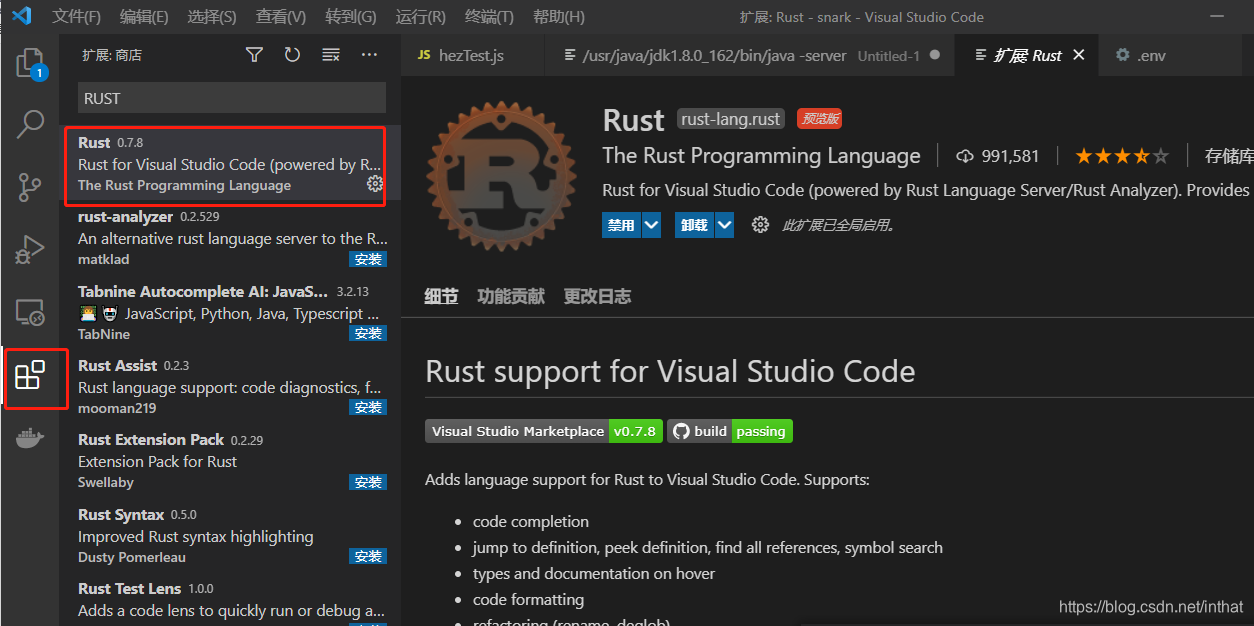
在VSCode上构建Rust的开发环境相对简单。首先,打开VSCode,点击插件工具栏,搜索“rust”以找到相应的插件。接着,创建一个新的文件夹,并用VSCode打开它,即可开始开发工作。
若要开发一个测试用的小程序,可以选择使用Cargo来搭建新项目,随后系统会自动生成一个包含众多文件的全新目录。完成这一步后,你便可以启动这个新项目,进而查看运行结果。
安装Rust或构建开发环境时,你是否遇到了什么特殊难题?欢迎留言分享你的经历。觉得这篇文章对你有帮助,别忘了点赞和转发。