你对制作游戏程序感兴趣吗?今天,我们就来详细了解一下打地鼠游戏程序的制作过程,从最初的策划到最终完成,这其中遇到了哪些挑战,都是满满的实用知识,绝对值得一看。
计划与开端
最初,我们就有制作打地鼠程序的打算,这一点在上期已经提到过。在自我努力和网友的支持下,这个项目得以启动。这其中,既有推动我们前进的动力,也有让人感到压力的因素。动力来源于对新程序的期待,而压力则是因为担心无法满足大家的期望。这只是一个日常编程中的小项目,许多编程者都有过类似的经历。从最初的一个简单想法,到逐步将其变为现实,这个过程充满了不确定性和挑战,但也让人收获了满满的成就感。
资源准备的重要性
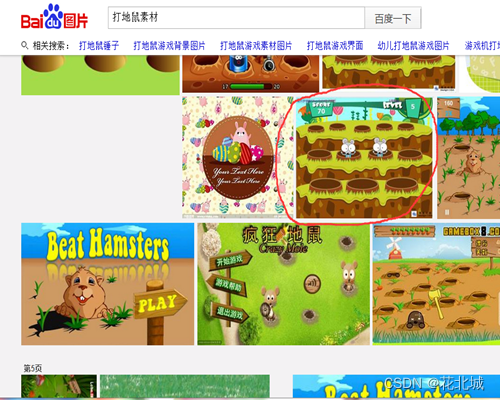
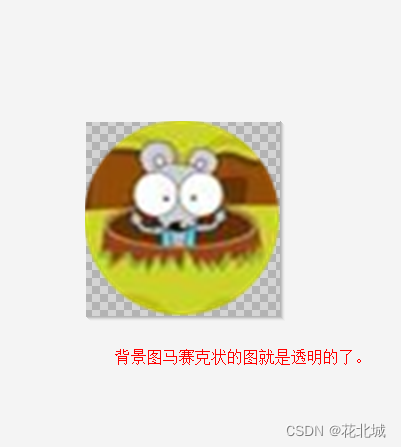
制作这款程序,首先要做好资源准备。游戏需要生动形象的图片,通常我们会从百度搜索获取。挑选合适的图片至关重要,比如这里选的圆形图案,还要用美图秀秀处理,确保背景透明。这一步看似简单,实则对游戏画面效果影响重大。在众多游戏制作过程中,资源准备常常被忽视,但事实上,良好的资源准备是成功的关键。举个例子,一些小型独立游戏开发者,在资源不足或准备不充分的情况下就开始编码,结果后期不得不返工重新准备资源。
程序功能简介
打地鼠程序操作简便,直接明了。地鼠会在屏幕的不同位置随机出现,玩家只需用手指点击,击中地鼠后会有击中效果并增加分数。这一玩法正是打地鼠游戏的核心所在。在开发这一功能时,需考虑众多实际因素,例如坐标的随机分配。许多类似游戏在功能设计时也会遇到这样的问题。这些因素直接影响到玩家的游戏体验,若功能设置不当,如地鼠出现位置过于规律,则会导致游戏趣味性大减。
<ImageView
        android:id=\"@+id/img1\"
        android:layout_width=\"wrap_content\"
        android:layout_height=\"wrap_content\"
        android:layout_x=\"30dp\"
        android:layout_y=\"100dp\"
        android:src=\"@drawable/img_ds0\" />
   <ImageView
        android:id=\"@+id/img2\"
        android:layout_width=\"wrap_content\"
        android:layout_height=\"wrap_content\"
        android:layout_x=\"130dp\"
        android:layout_y=\"100dp\"
        android:src=\"@drawable/img_ds0\" />
   <ImageView
        android:id=\"@+id/img3\"
        android:layout_width=\"wrap_content\"
        android:layout_height=\"wrap_content\"
        android:layout_x=\"230dp\"
        android:layout_y=\"100dp\"
        android:src=\"@drawable/img_ds0\" />
   <ImageView
        android:id=\"@+id/img4\"
        android:layout_width=\"wrap_content\"
        android:layout_height=\"wrap_content\"
        android:layout_x=\"30dp\"
        android:layout_y=\"200dp\"
        android:src=\"@drawable/img_ds0\" />
    <ImageView
        android:id=\"@+id/img5\"
        android:layout_width=\"wrap_content\"
        android:layout_height=\"wrap_content\"
        android:layout_x=\"130dp\"
        android:layout_y=\"200dp\"
        android:src=\"@drawable/img_ds0\" />
   <ImageView
        android:id=\"@+id/img6\"
        android:layout_width=\"wrap_content\"
        android:layout_height=\"wrap_content\"
        android:layout_x=\"230dp\"
        android:layout_y=\"200dp\"
        android:src=\"@drawable/img_ds0\" />
  <ImageView
        android:id=\"@+id/img7\"
        android:layout_width=\"wrap_content\"
        android:layout_height=\"wrap_content\"
        android:layout_x=\"30dp\"
        android:layout_y=\"300dp\"
        android:src=\"@drawable/img_ds0\" />
   <ImageView
        android:id=\"@+id/img8\"
        android:layout_width=\"wrap_content\"
        android:layout_height=\"wrap_content\"
        android:layout_x=\"130dp\"
        android:layout_y=\"300dp\"
        android:src=\"@drawable/img_ds0\" />
   <ImageView
        android:id=\"@+id/img9\"
        android:layout_width=\"wrap_content\"
        android:layout_height=\"wrap_content\"
        android:layout_x=\"230dp\"
        android:layout_y=\"300dp\"
        android:src=\"@drawable/img_ds0\" />

   <TextView
        android:id=\"@+id/txtFen\"
        android:layout_width=\"wrap_content\"
        android:layout_height=\"wrap_content\"
        android:layout_x=\"11dp\"
        android:layout_y=\"14dp\"
        android:text=\"得分:\"
        android:textAppearance=\"?android:attr/textAppearanceLarge\" />

   <TextView
        android:id=\"@+id/txtsmz\"
        android:layout_width=\"wrap_content\"
        android:layout_height=\"wrap_content\"
        android:layout_x=\"10dp\"
        android:layout_y=\"50dp\"
        android:text=\"生命值:\" />
   <TextView
        android:id=\"@+id/txtwcd\"
        android:layout_width=\"wrap_content\"
        android:layout_height=\"wrap_content\"
        android:layout_x=\"10dp\"
        android:layout_y=\"73dp\"
        android:text=\"完成度:\" />
   <TextView
        android:id=\"@+id/txtShiWu\"
        android:layout_width=\"wrap_content\"
        android:layout_height=\"wrap_content\"
        android:layout_x=\"128dp\"
        android:layout_y=\"13dp\"
        android:text=\"失误:\"
        android:textAppearance=\"?android:attr/textAppearanceLarge\" />
   <TextView
        android:id=\"@+id/txtdj\"
        android:layout_width=\"wrap_content\"
        android:layout_height=\"wrap_content\"
        android:layout_x=\"234dp\"
        android:layout_y=\"14dp\"
        android:text=\"等级:\"
        android:textAppearance=\"?android:attr/textAppearanceLarge\" />

   <Button
        android:id=\"@+id/btnKaiGuan\"
        android:layout_width=\"wrap_content\"
        android:layout_height=\"wrap_content\"
        android:layout_x=\"120dp\"
        android:layout_y=\"360dp\"
        android:text=\"开始\" />

   <TextView
        android:id=\"@+id/txtzhizuo\"
        android:textSize=\"6pt\"
        android:layout_width=\"wrap_content\"
        android:layout_height=\"wrap_content\"
        android:layout_x=\"220dp\"
        android:layout_y=\"415dp\"
        android:text=\"by:春天的故事\"/>
布局与文件准备
<Button
        android:id=\"@+id/btn_up\"
        android:layout_width=\"185dp\"
        android:layout_height=\"wrap_content\"
        android:layout_x=\"50dp\"
        android:layout_y=\"30dp\"
        android:text=\"上一关\" />

   <Button
        android:id=\"@+id/btn_next\"
        android:layout_width=\"185dp\"
        android:layout_height=\"wrap_content\"
        android:layout_x=\"50dp\"
        android:layout_y=\"90dp\"
        android:text=\"下一关\" />

   <Button
        android:id=\"@+id/btn_null\"
        android:layout_width=\"185dp\"
        android:layout_height=\"wrap_content\"
        android:layout_x=\"50dp\"
        android:layout_y=\"150dp\"
        android:text=\"返回\" />

   <TextView
        android:id=\"gk_zhizuozhe\"
        android:layout_width=\"wrap_content\"
        android:layout_height=\"wrap_content\"
        android:layout_x=\"220\"
        android:layout_y=\"430\"
        android:text=\"by:春天的故事\"/>
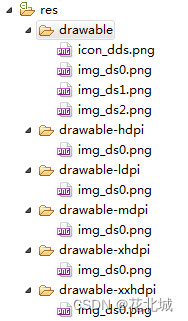
编程时,布局是关键。必须先设置九个鼠洞的显示,使用绝对布局方式。得自己编写.xml布局文件的代码,并设定间距为100dp。这要求对布局编程有相当的认知和熟练度。比如创建文件夹,将图片资源复制到res文件夹下等,都是程序正常运行的基础。布局操作在各个编程项目中大体相同,合理的布局能稳固后续编码等工作,一旦出错,可能引发程序显示混乱等问题。
开发中的资源替换问题
<item android:id=\"@+id/menu_tg\"
        android:title=\"关卡:1\"
        android:orderInCategory=\"100\" />
  <item android:id=\"@+id/menu_nd\"
        android:title=\"难度\"
        android:orderInCategory=\"100\" />
开发过程中,遇到了一个问题:更换了res文件夹中的图片,但图片并未生效。在res文件夹内预览时,图片已经替换,然而在模拟器或实际设备上运行时,图片依旧没有更新。这个问题相当棘手。经过分析,发现是由于首次运行后,资源文件在bin目录下的复制机制出了问题。由于不清楚图片是否已经更改,便使用了之前的文件打包,导致新图片无法正常使用。在开发过程中,许多程序员都可能遇到这类隐藏的机制问题,解决它们需要深入排查,耗费大量精力。这充分说明了编程工作对严谨性的极高要求。
<string name=\"app_name\">打地鼠</string>
<string name=\"action_settings\">Settings</string>
<string name=\"menu_settings\">设置</string>
<string name=\"title_activity_main\">打地鼠(春天的故事制作)</string>
从中的收获
在解决这个程序制作中遇到的问题时,我收获颇丰。这不仅让我丰富了个人日志,提高了编程技能,还让我深刻记住了解决方法。编程过程中,不断总结经验至关重要。对众多编程爱好者而言,每制作一个程序都是一次成长的机会。在此,我想请教大家一个问题:在你们的编程经历中,是否也遇到过类似的资源替换难题?希望各位能点赞并分享这篇文章,以便让更多的人在编程路上少走弯路。
android:icon=\"@drawable/icon_dds\"