301重定向使用户在外贸建站时经常会遇到的一种重定向技术,站长通常会通过编辑.htaccess文件或者return语句等方法来实现网页地址的迁移,以避免404错误的出现,诚然了解301重定向的相关设置有利于网站的正常运行,进而提升用户访问体验和提高网站搜索排名,所以下文将为大家介绍如何设置301重定向,为大家搭建外贸网站提供一些准备。
一、Apache网站服务器301重定向
在网站的根目标找到如下这个文件:
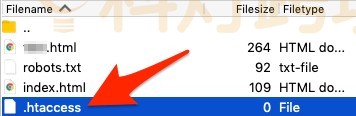

如果没有找到这个文件?有以下两种可能:
- 网站没有.htaccess文件。可以使用 Notepad(在 Windows 平台)或TextEdit(Mac 平台)创建该文件,只需要新建一个文件并将其保存为.htaccess即可,记得要移除标准的.txt文件扩展名;
- 网站并非运行在Apache网站服务器上。网站服务器有许多种,Apache,Windows/IIS 和 Nginx是最常见的几种,其中只有 Apache 服务器使用.htaccess 文件。若要检查网站是否运行在Apache服务器上,请询问自己的主机托管商。
1、将旧页面重定向到新页面
| Redirect 301 /old-page.html /new-page.html |
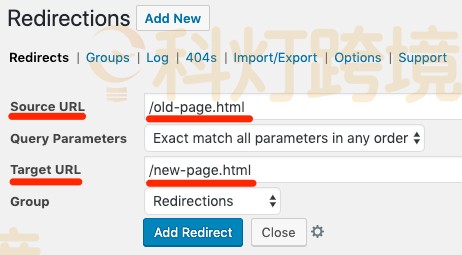
如果在使用免费WordPress插件Redirection,此时用户可以不用通过编辑.htaccess文件来实现重定向,只需添加一个301重定向就可以了,如下图:
2、将旧域名指向新域名
| “RewriteEngine on RewriteCond %{HTTP_HOST} ^oldsite.com [NC,OR] RewriteCond %{HTTP_HOST} ^www.oldsite.com [NC] RewriteRule ^(.*)$ https://newsite.com/\\ [L,R=301,NC]” |
注:如果.htaccess已经包含了RewriteEngine on代码片段,那就不要重复了,只需要复制粘贴剩下的代码即可,当然在Cpanel中也可以执行这样的操作,这种做法也是比较普遍的做法。
3、将整个域名由不包含www的版本重定向到带www的版本
从 non-www 到 www:
| RewriteEngine on RewriteCond %{HTTP_HOST} ^xxx.com [NC] RewriteRule ^(.*)$ http://www.xxx.com/\\ [L,R=301,NC] |
从 www 到 non-www:
| RewriteEngine on RewriteCond %{HTTP_HOST} ^www.xxx.com [NC] RewriteRule ^(.*)$ http://xxx.com/\\ [L,R=301,NC] |
注:.htaccess 文件中的代码布局和顺序同样会有影响。当多个(向浏览器发出的)指令的排列顺序“错误”(如:重定向链等)时,可能会遭遇副作用;如果打算在 htaccess 文件中实现多个 301 重定向,不妨深入研究一下 .htaccess 文件。
4、将网站域名由 HTTP 重定向到 HTTPS
| “RewriteEngine On RewriteCond %{HTTPS} off RewriteRule ^(.*)$ https://%{HTTP_HOST}%{REQUEST_URI} [L,R=301]” |
注:要实现上述重定向,网站必须已经装有 SSL 证书,否则会收到“不安全”(”Not secure”)证书的信息。
5、网站域名由HTTP重定向到HTTPS,将non-www重定向到www
| RewriteEngine On RewriteCond %{HTTP_HOST} !^www\\. [NC] RewriteRule ^ https://www.%{HTTP_HOST}%{REQUEST_URI} [L,R=301] RewriteCond %{HTTP:X-Forwarded-Proto} !https RewriteCond %{HTTPS} off RewriteRule ^ https://%{HTTP_HOST}%{REQUEST_URI} [L,R=301] |
二、 Nginx服务器301重定向
1、return重定向
到目前为止最简单、最快的方法是使用return语句,因为不需要计算正则表达式,且是永久重定向,将以下代码放入服务器块中:
| return 301 https://xxx.com$request_uri; |
如果想要临时重定向,请使用302,完整的示例服务器块可以是:
| server { listen 80; listen [::]:80; hostname xxx.com www.xxx.com; return 301 https://xxx.com$request_uri; } |
2、HTTP重定向到HTTPS
| return 301 https://$host$request_uri; |
3、将非www重定向到www
| if ( $host !~ ^www\\. ) { return 301 $scheme://www.$host$request_uri; } |
4、将www重定向到非www
| if ( $host ~ ^www\\.(?<domain>.+)$ ) { return 301 $scheme://$domain$request_uri; } |
三、Windows/IIS 服务器301重定向
1、将旧页面重定向到新页面
| <location path=”page-to-redirect.html”> <system.webServer> <httpRedirect enabled=”true” destination=”http://www.xxx.co.uk/new-page.html” httpResponseStatus=”Permanent” /> </system.webServer> </location> |
2、将旧域名指向新域名
| <system.webServer> <httpRedirect enabled=”true” destination=”http://www.xxx.com/” /> </system.webServer> |
3、全部301重定向
将所有页面或所有没有特定规则的页面重定向到另一个页面,可以在httpRedirect中添加exactDestination=“true”规则。
| <system.webServer> <httpRedirect enabled=”true” exactDestination=”true” destination=”http://www.xxx.com/” /> </system.webServer> |
4、特定的重定向和全面重定向
| <configuration> <location path=”old-page-1.html”> <system.webServer> <httpRedirect enabled=”true” destination=”http://www.newsite.co.uk/new-page-a/” httpResponseStatus=”Permanent” /> </system.webServer> </location> <location path=”old-page-2.html”> <system.webServer> <httpRedirect enabled=”true” destination=”http://www.newsite.co.uk/new-page-b/” httpResponseStatus=”Permanent” /> </system.webServer> </location> <system.webServer> <httpRedirect enabled=”true” exactDestination=”true” destination=”http://www.newsite.co.uk/” httpResponseStatus=”Permanent” /> </system.webServer> </configuration> |






